
Choosing a push button involves more than selecting a front shape or LED color. To specify the right assembly, you also need to understand the components behind the panel: the contacts that actually switch the circuit, the illumination unit, and the terminals that connect everything to your wiring.
In this guide, we explain button caps and operators, contact blocks, LED units, and terminals using examples from CDOE product documentation. We also outline what to check when selecting a complete switch or asking about replacement components.
Component arrangements vary by series. A 22 mm plastic push button and a 16 mm metal push button can be built very differently, even when they perform the same function. Always refer to the documentation for your exact model before installation or replacement.
What Are the Main Components of a Push Button Switch?
A push button switch is best understood as a short chain of parts. The operator receives the user's action, the contact section changes the circuit state, an optional LED unit provides visual feedback, and terminals connect the switch to the control circuit. Mounting parts hold the assembly in the panel.
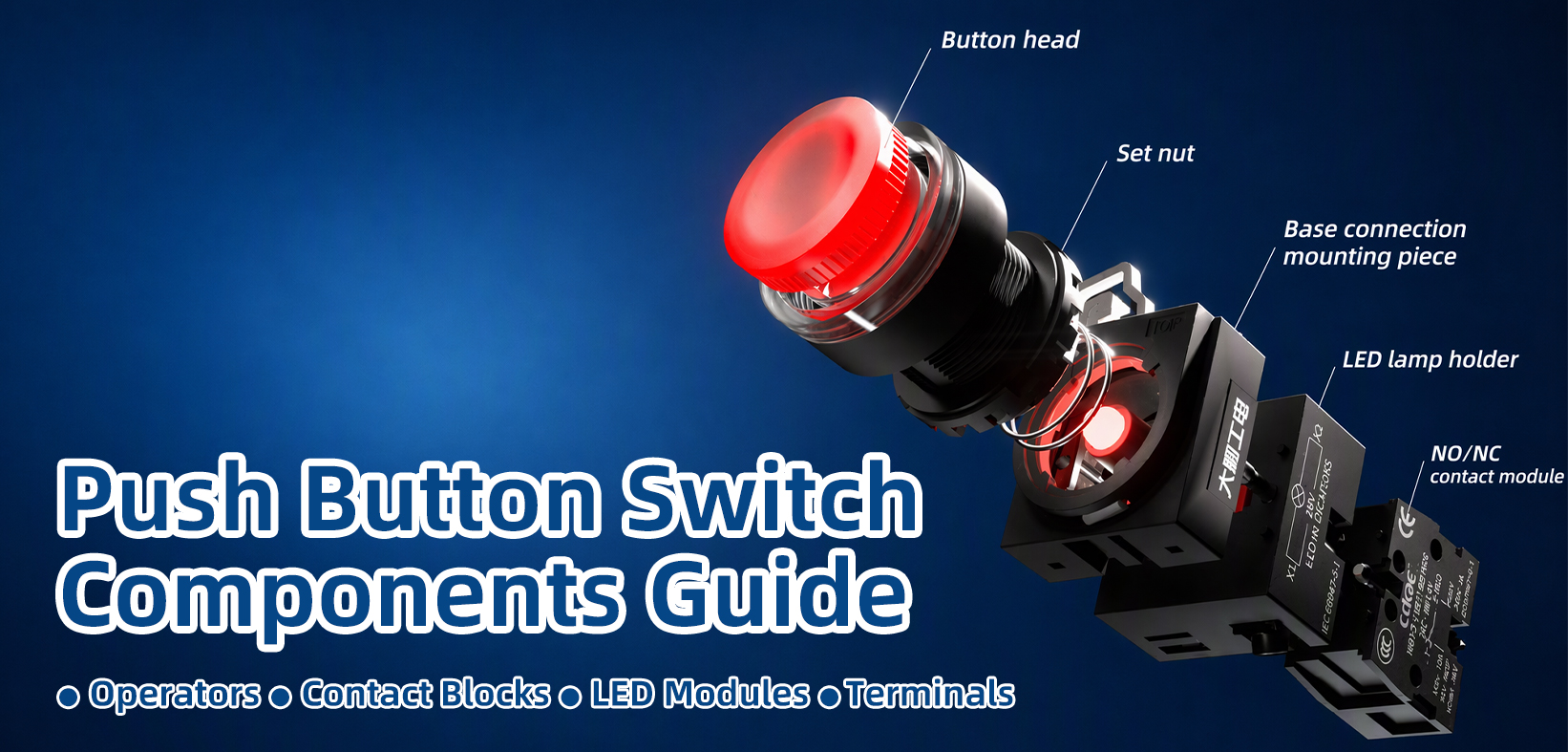
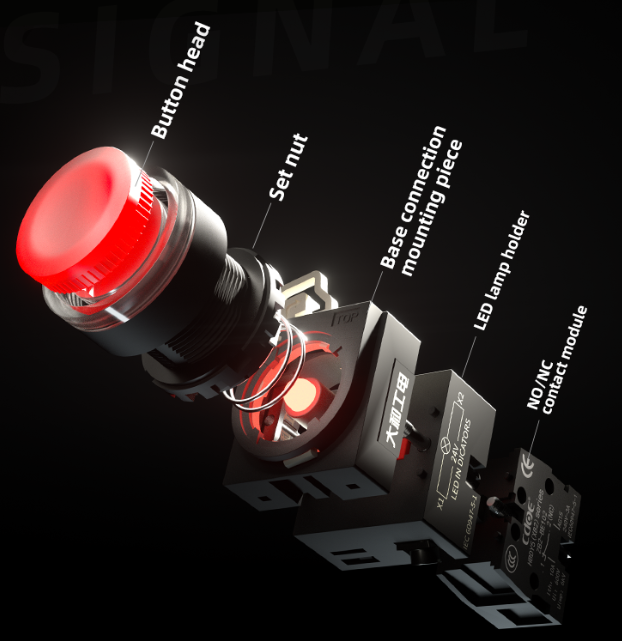
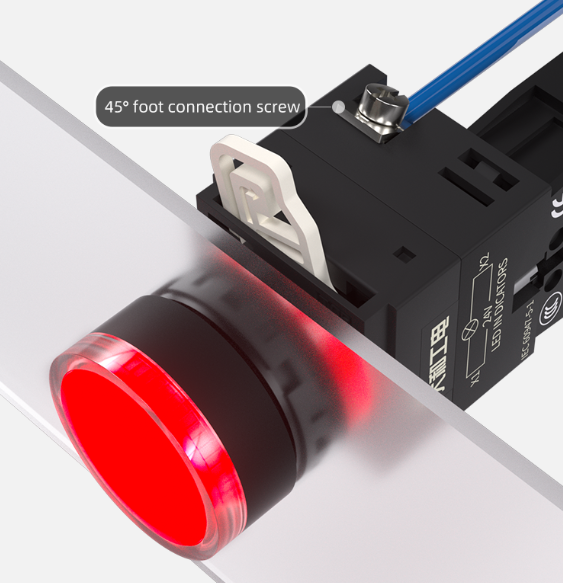
The CDOE HBDY5 series is a useful example because its structure is modular. From the front of the panel to the back, the HBDY5 assembly consists of:
- Button head (operator) – the part the user presses, available in several head styles.
- Fixing nut – secures the head to the panel.
- Base / holder – attaches to the head with a rotate-and-lock buckle rather than screws.
- Contact module(s) – clipped onto the base according to the ordered contact configuration.
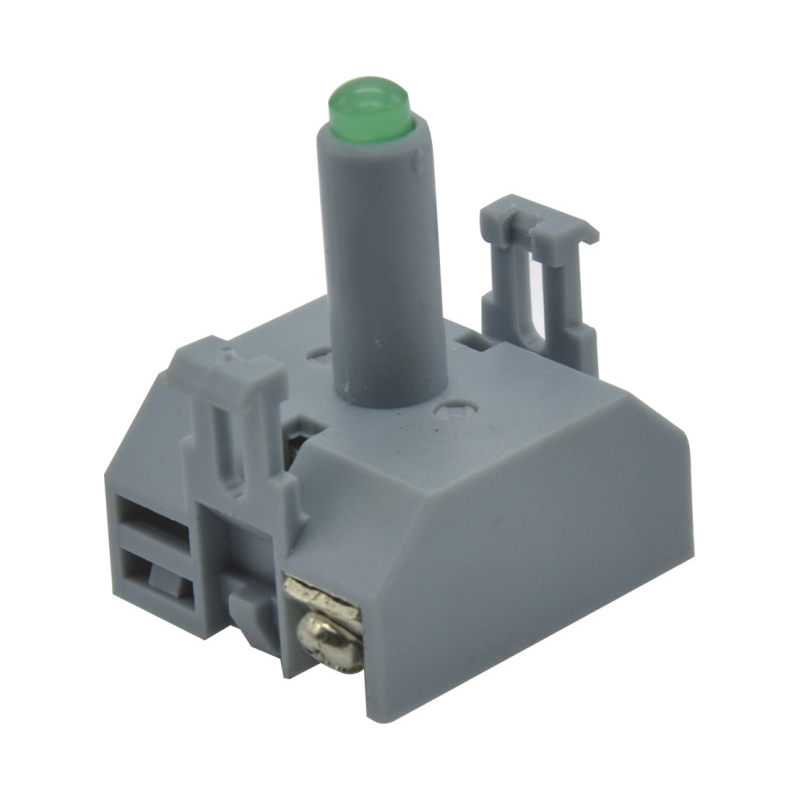
- LED unit – a separate lamp unit for illuminated versions.
- Terminals – screw terminals on the contact and lamp units.
Not every CDOE series follows this layout. Many metal push buttons, for example, use a one-piece body with pin terminals at the rear. The table below shows what each component is and what to check on the product page, regardless of series.
| Component | Location | What to check when selecting |
|---|---|---|
| Button cap / operator | Front of the panel | Head shape, legend or symbol, operating action |
| Contact block | Rear assembly | Contact configuration (NO/NC), electrical rating |
| LED unit | As marked in the model documentation | Rated voltage, AC/DC, color, wiring requirement |
| Terminals / connector | Wiring side | Terminal type, matching connector model |
| Mounting parts | Panel and rear | Hole size, panel thickness, fixing method, seal position |
Button Caps and Operators: The Parts You Press
Button Cap vs. Complete Operator
Two terms are often used loosely, so we define them here for this article.
- Button cap refers to the visible front surface of the button: the plastic or metal face that may carry a color, legend, symbol, or illuminated ring.
- Operator (or button head) refers to the complete front-side component, including the cap, the plunger or mechanism behind it, and the housing that mounts through the panel.
In some series the cap is a separate part; in others it is permanently fitted to the head. Do not assume a cap can be removed or swapped unless the model documentation says so. When you need a replacement front part, ask for the operator by complete model number rather than describing the cap alone.
Head Shapes, Symbols, and Illumination Styles
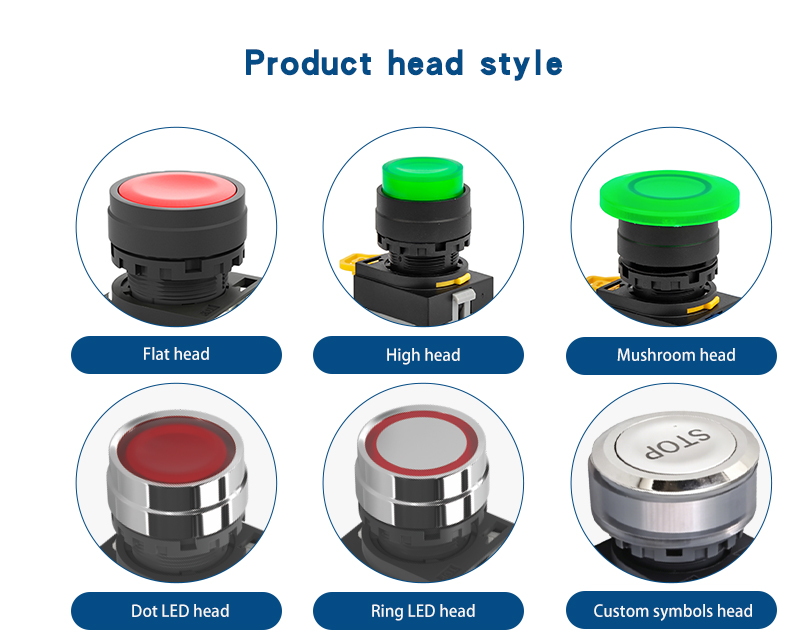
Using the HBDY5 series as an example, operators are available in flat round, extended (high) head, and mushroom head styles. Illuminated versions include full-face illumination and ring-illuminated heads, and some CDOE metal series offer a ring with a power symbol. The head style affects visibility, how easily the button is pressed, and in the case of mushroom heads, how it is used for stop functions.
For a broader comparison of button types, see our guide to Types of Push Button Switches.
What to Confirm Before Selecting an Operator
- Complete series and model number
- Head style (flat, extended, mushroom, ring)
- Legend or symbol requirement
- Illuminated or non-illuminated
- Operating action (momentary or latching)
- Compatibility with the base, contact section, and mounting parts of the same series
When you contact our team about a button head, include the complete switch model and the required operating and illumination options.
Contact Blocks: Understanding the Switching Function
What Does the Contact Section Do?
The contact section is where the mechanical action becomes an electrical change. When the operator is pressed, a plunger moves the internal contacts, and the circuit connected to those contacts either closes or opens. When the button is released (on a momentary type), a spring returns the contacts to their resting state.
The front of the button tells you how the switch looks and feels. The contact section tells you what the switch does in the circuit. Both must be specified.
Normally Open and Normally Closed Contacts
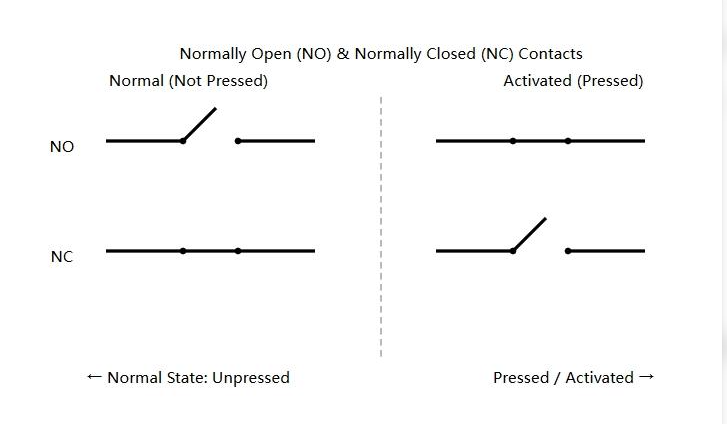
"Normal" means the state of the contact when the button is not being operated.
| Contact type | Not pressed (normal state) | Pressed |
|---|---|---|
| NO (Normally Open) | Circuit open | Circuit closed |
| NC (Normally Closed) | Circuit closed | Circuit open |
NO contacts are typically used to start or trigger a function. NC contacts are typically used where pressing the button should interrupt a circuit. Whether a given NC contact is suitable for a specific safety function depends on the model, its rating, and the applicable standard for your equipment; confirm this with our team rather than assuming it from the contact type alone.
Reading Contact Configurations
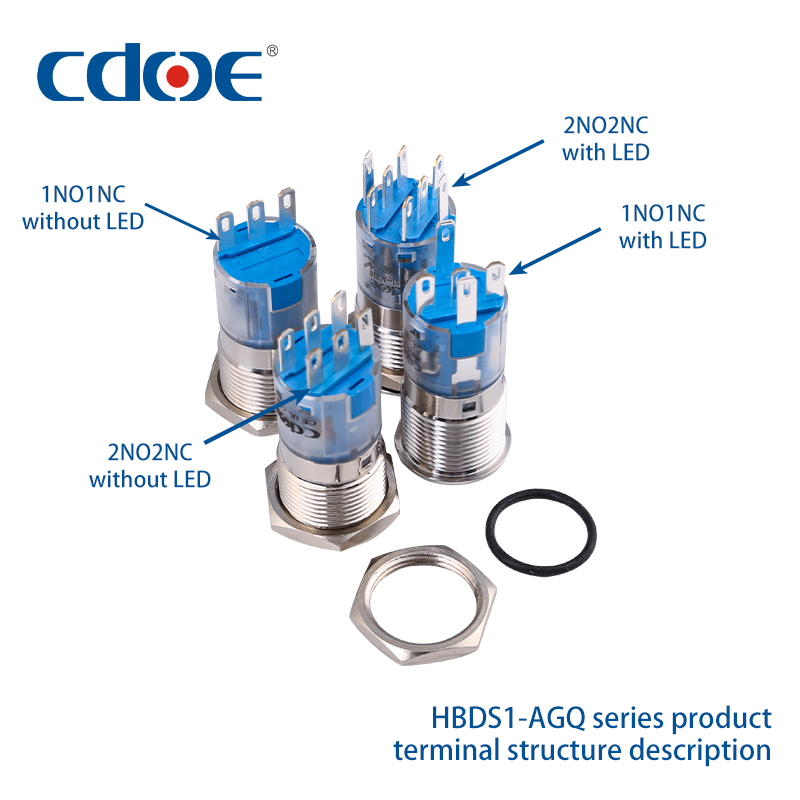
On CDOE product pages, the contact configuration field uses a shorthand such as 1NO, 1NC, 1NO1NC, or 2NO2NC. The HBDS0-KB series, for example, is offered in 1NO1NC and 2NO2NC versions with screw terminals.
| Contact Configuration | NO Contacts | NC Contacts | Typical Uses |
| 1NO | 1 | 0 | One way start signal |
| 1NC | 0 | 1 | One way disconnected signal |
| 1NO1NC | 1 | 1 | Dual path control |
| 2NO2NC | 2 | 2 | Multiple channel control |
- 1NO1NC means the switch contains one normally open contact and one normally closed contact, operated together by the same button press.
- 2NO2NC means two of each, which allows one button to switch up to four separate circuits.
The number of terminals on the rear of the switch increases with the configuration, which is why the contact configuration and the terminal section of this guide are closely related.
Contact Configuration vs. Operating Action
These are two separate selection questions:
- What contact combination do I need? (1NO, 1NC, 1NO1NC, 2NO2NC…) This defines how many circuits the button can switch and their resting state.
- What operating action do I need? (momentary or latching) This defines whether the contacts return to the normal state when you release the button or stay switched until pressed again.
A 1NO1NC switch can be momentary or latching. The configuration does not determine the action, and the action does not determine the configuration. A detailed comparison of operating actions is covered in a separate article.
For wiring examples by contact type, see our Push Button Wiring Guide.
LED Modules and Illumination Units: Providing Visual Feedback
The LED Circuit and Switch Circuit
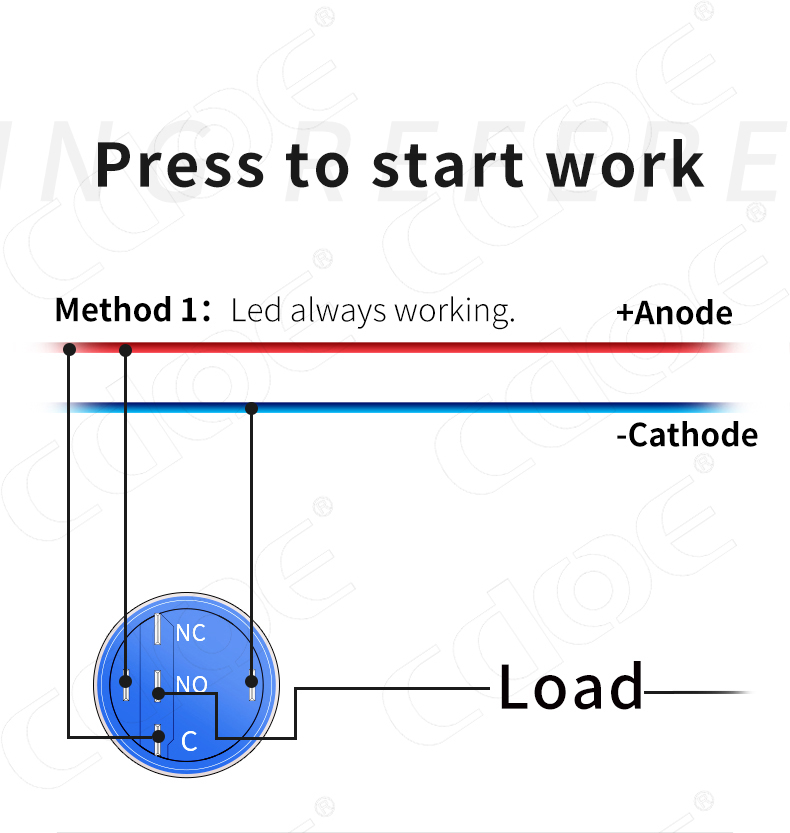
This is the most important point in this section: the LED is a separate circuit from the switch contacts.
Pressing an illuminated push button does not automatically turn on its LED. The LED has its own terminals or pins and lights whenever its rated voltage is applied to them. How it behaves depends on how you wire it. In the CDOE wiring guide, two common arrangements are shown: the LED is powered continuously and the load starts when the button is pressed, or the LED is wired so that it indicates the state of the load or a PLC output. Either way, the lamp and the contacts are controlled independently.
What to Check When Selecting Illumination
- Rated LED voltage for the specific model (CDOE offers several options such as 6 V, 12 V, 24 V, 110 V, and 220 V depending on series)
- AC or DC requirement for that voltage version
- Polarity requirement — many DC LED versions have a defined anode and cathode
- LED color and display style (dot, ring, full face, symbol)
- Terminal or pin diagram showing which connections belong to the LED
- Whether the LED unit is a replaceable component in that series
A common ordering mistake is selecting a 24 V illuminated button for a 220 V control panel. The contact rating and the LED rating are listed separately on CDOE product pages — check both.
Separate Module or Integrated LED Unit?
For the HBDY5 series, the illumination unit is a separate lamp unit fitted to the base alongside the contact modules. For the HBDS1-AGQ metal series, the LED is built into the button body; according to the AGQ instruction sheet, it is not a user-replaceable part. If the illumination requirement changes, the complete switch is specified again.
For connection details, see the LED section of our Push Button Wiring Guide.
Terminals and Connectors: Connecting the Button to the Circuit
Screw Terminals
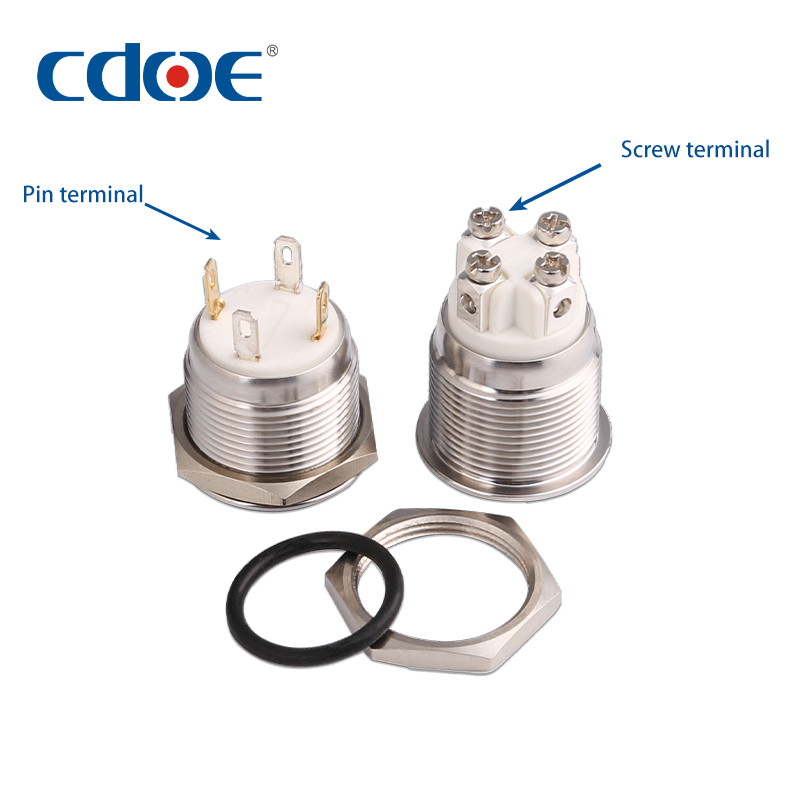
Screw terminals clamp a stripped wire end under a screw head. They are common on 22 mm panel-mount series. The HBDS0-KB product page, for example, lists "screw terminal" as the terminal type, and the rear view shows the terminals grouped by contact.
When working with screw terminals, check the following in the model documentation:
- Terminal type and number of terminals for the ordered configuration
- Terminal markings (for example NO, NC, and common, or numbered positions)
- Recommended conductor size and whether ferrules are required
- Torque or tightening guidance, if specified
Pin Terminals and Matching Connectors
Many CDOE metal push buttons use pin terminals at the rear. The AGQ instruction sheet describes two connection options: soldering wires directly to the pins, with notes on soldering time and temperature, or using a dedicated plug-in connector harness.
For AGQ pin-terminal switches, CDOE matches the connector to the contact and LED combination of the switch ordered; harnesses with 3, 5, 6, or 8 wires are available, with color-coded leads for NO, NC, common, and LED anode/cathode.
Matching connectors are currently available for a limited set of CDOE series only: HBDS1-D22C series, HBDS1-AGQ, HBDGQ22, HBDGQ25, and the four-tab emergency stop versions of HBDS1-AY / HBDS1-GQ. Other series do not have a supported connector, and we do not recommend adapting third-party connectors. If you are unsure whether your model is supported, contact our team with the complete model number.
See the AGQ instruction sheet for connection details for that series.
| Comparing items | Screw Terminal | Pin Terminal |
| Connection method | Screw the wire | Solder or match connectors |
| Installation method | Field wiring | Solder or plug |
| Mode of maintenance | Can be re-fastened | Depends on the wiring |
| Notes | Wire diameter, torque | Pin definition, connector compatibility |
Mounting Nuts, Holders, and Seals: Supporting the Assembly
The four core components only work if the assembly is held correctly in the panel. Mounting parts rarely appear in a product title, but they determine whether the button fits and whether the seal performs as intended.
For the HBDY5 series, the head is secured with a fixing nut, and the base locks onto the head with a rotating buckle. For the AGQ series, the instruction sheet shows a waterproof rubber gasket that sits between the button flange and the panel, and specifies the panel thickness range.
Before ordering, check:
- Panel cut-out diameter (16 mm, 19 mm, 22 mm, etc.)
- Allowed panel thickness range for the model
- Depth available behind the panel for the contact section and wiring
- Position and orientation of the sealing gasket
- Fixing method and any torque requirement
Ingress protection ratings depend on the specific model, correct gasket placement, and the panel surface. Refer to the rating stated for your model rather than assuming a general value.
How the Components Work Together: A CDOE Product Example
Consider an illuminated HBDY5 flat round head push button.
- What the user operates: the plastic flat head, with an illuminated face.
- Behind the panel: the head passes through the 22 mm cut-out and is secured by the fixing nut. The base locks onto the head, and the contact module(s) clip onto the base.
- Contact change: with a 1NO1NC configuration, pressing the head closes the NO contact and opens the NC contact at the same time. On the momentary version, both return to their normal state on release.
- LED: the lamp unit is fitted to the base and has its own screw terminals. It lights when its rated voltage is applied, independently of the contact state.
- Wiring and fixing: screw terminals on the contact module and lamp unit; the fixing nut and base buckle hold the assembly in place.
View the product page for this model for the complete specification.
How to Select Compatible Push Button Components?
Compatibility is confirmed by model number and documentation, not by appearance. Two buttons with the same cut-out size may use different bases, terminals, and LED units. Use the checklist below to gather the information our team needs.
| Information to provide | Question to answer |
|---|---|
| Model number | Which complete model, not only the series? |
| Purpose | A complete switch, or confirmation of one replacement part? |
| Operating action | Momentary or latching? |
| Contact requirement | Which combination — 1NO, 1NC, 1NO1NC, 2NO2NC? |
| LED requirement | Supply voltage, AC/DC, color, display style? |
| Connection method | Screw terminals, pin terminals with soldering, or a matching connector? |
| Mounting conditions | Cut-out diameter, panel thickness, depth behind the panel? |
Before ordering a replacement component, send us the complete model number and clear photos of the existing assembly. Please ask our team to confirm the matching part and ordering requirements before purchase.
Need Help Finding Compatible Push Button Switch Components?
Not sure whether a contact block, LED module, or mounting component is compatible with your existing push button switch?
Send us your complete model number and photos of the front and rear terminals. Our team can help identify the correct configuration and matching components.
Contact CDOE for Technical Support
Frequently Asked Questions About Push Button Components
- What is the difference between a button cap and a complete operator?
- A button cap is the visible front surface of a push button, while the complete operator includes the cap, plunger, and housing. Depending on the switch series, the cap may be removable or permanently integrated into the operator. Always check the manufacturer's documentation before attempting to remove or replace individual parts.
What does a contact block do?It converts the button press into a change of circuit state. Its NO and NC contacts open or close when the button is operated, according to the configuration listed on the product page.Does the LED turn on automatically when the button is pressed?
- No. The LED has its own terminals and lights when its rated voltage is applied. Whether it follows the button depends on how you wire it. See the LED section of our wiring guide.
- Can I replace individual push button components?
- It depends on the series. Modular series such as HBDY5 have separable heads, bases, contact modules, and lamp units. Integrated designs such as AGQ do not have user-replaceable LEDs. Confirm with our team before ordering a part.
- Are push button components interchangeable between series or brands?
- We do not recommend assuming interchangeability, even for the same cut-out size. Send us the model number, photos of the front and terminals, and your application requirements, and we will confirm what matches.
Need Help Selecting a CDOE Push Button Configuration?
Operator, contact configuration, LED unit, terminals, and mounting parts must be specified together to arrive at a switch that fits the panel and does the right job in the circuit.
Send us your mounting requirements, operating action, contact configuration, LED supply specification, and preferred connection method. For an existing button, include the complete model number and clear photos of the front and terminals.
Contact our team to discuss a suitable configuration or confirm the matching components before ordering.